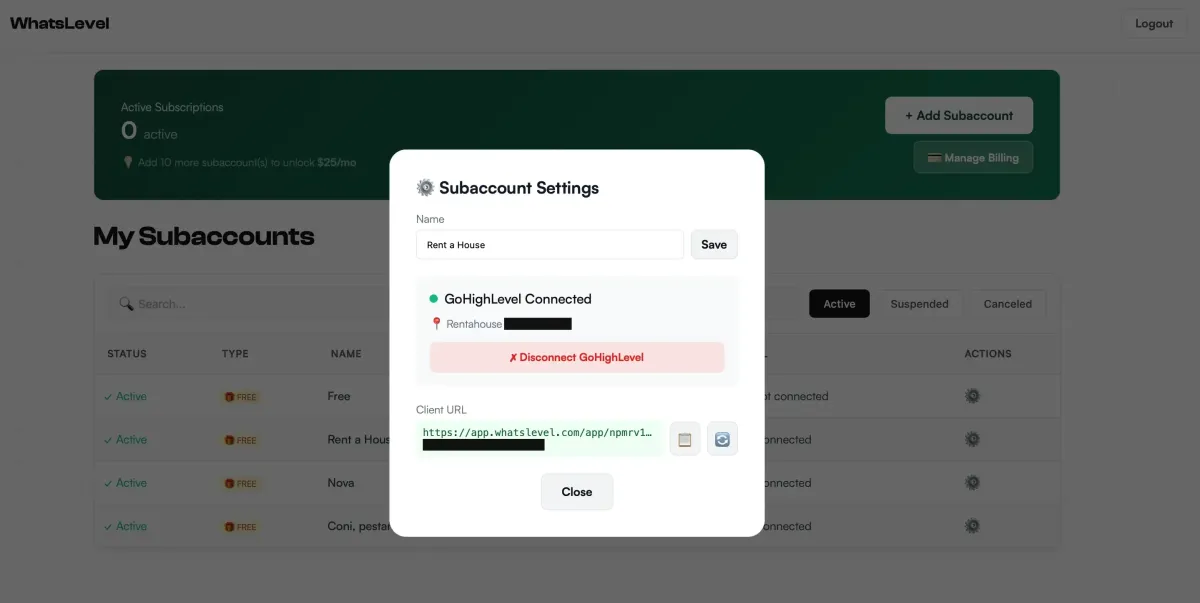
Best Native WhatsApp Integration for GoHighLevel in 2026 (No Per-Message Fees)
The Silent Profit Killer in Your Agency: Why You Need to Leave Twilio Behind
If you run a HighLevel (GHL) agency, you are likely familiar with the “Success Penalty.” It allows you to scale, but it punishes you for it. It works like this: You sign a high-ticket client, you build them an amazing automation system with AI appointment setters and reactivation campaigns, they start generating leads, and then… the Twilio bill arrives.
For years, agencies have accepted this as a cost of doing business. You pay a markup on every SMS (often 20-30% above carrier rates), you pay for every Template Message on WhatsApp ($0.08 - $0.12), and you navigate the labyrinth of Facebook Business Verification.
But in 2026, the specific economics have changed.
The rise of Flat-Rate “Phone-Based” Integrations has rendered the old model obsolete for high-volume senders. Why pay a variable tax on every single “Hello” when you can pay a flat subscription? In this definitive guide, we will explore why WhatsLevel ($30/month per account) has emerged as the logical choice for agencies who want to stop bleeding profit margin.
We are going to cover everything: the hidden costs of the official API, the technical superiority of native nodes, and the exact strategy to implement this for your clients to save them (and you) thousands of dollars per year.
Part 1: The Three “Hidden Taxes” of Official APIs
Most agency owners look at the “Per Message” cost and think that’s the only expense. They calculate: “Okay, it’s $0.05 per conversation, I can absorb that.” They are missing the bigger picture. There are three layers of friction that are likely costing you thousands of dollars per month.
1. The “24-Hour Rule” & Template Tax
This is the most frustrating rule in the Meta ecosystem, and it is the single biggest reason why marketing campaigns fail on WhatsApp. If a user has not messaged you in the last 24 hours, you are forbidden from sending them a free-form message.
Think about the implications of this:
You CANNOT just say “Hey, are we still on for tomorrow?” if the window is closed.
You CANNOT send a “Happy Birthday” offer unless they messaged you yesterday.
You CANNOT build a long-term nurture sequence that checks in once a week.
To bridge this gap, Meta forces you to use a “Template Message.”
Templates must be pre-approved by Meta (time cost).
Templates cost money to send (approx $0.05 - $0.15 depending on country).
If you have a list of 10,000 leads and want to reactivate them, that’s $500 minimum… just to say “Hello”.
2. The Verification Nightmare
To use the official WhatsApp Business API (via LeadConnector or Twilio), you must verify your Business Manager (BM).
Have you ever tried to verify a local plumber who doesn’t have a website?
Have you tried to verify a “Make Money Online” offer?
Have you verified a Crypto or Credit Repair business?
It is hell. It takes weeks. Documents are rejected. Accounts are banned before sending a single message because the algorithm flagged “high risk.” Your team wastes dozens of hours chasing support tickets instead of selling.
3. The “Middleman Markup”
SaaS wrappers (like Wazzup or AppLevel) solve the ease-of-use problem but often introduce high seat costs or per-channel fees that scale linearly.
If you pay $50 per subaccount number (as with some competitors), and you have 100 clients, that’s $5,000 per month fixed cost.
While better than variable per-message costs for some users, it still eats heavily into margins.
Unstable service that can lead to bad quality outreach for you and your clients.
Part 2: The Logic of WhatsLevel ($30/mo Flat)
WhatsLevel takes a different approach. It acts as a Native Telephony Provider that sits underneath GHL, replacing Twilio for that sub-account.
The Price Point:
WhatsLevel charges a flat $30 per month per account.
No per-message fees.
No template fees.
No volume limits (other than physical device limits).
The Math:
If your client sends 1,000 marketing messages a month via Official API:
1,000 x $0.10 (avg template cost) = $100.
With WhatsLevel:Flat fee = $30.
Savings: $70/month on just 1,000 messages.
If they send 10,000 messages, the savings are nearly $1,000/month.
How It Works (The Non-Technical Version)
Imagine if you could trick GoHighLevel into thinking your physical iPhone is a Twilio server.
When GHL says “Send SMS,” it routes the text request to your iPhone.
Your iPhone receives the packet, translates it, and sends it via WhatsApp.
When a reply comes in, your iPhone pushes it back to GHL’s conversation tab.
This is exactly what WhatsLevel does. It connects via QR Code (just like WhatsApp Web).

Why “Native” Is The Key
In the early days of GHL WhatsApp tools, you had to use “Custom Webhooks.” You had to build complex Zapier triggers.
With WhatsLevel:
Unified Conversation View: Messages appear in the native chat window.
Native Automations: Use “Reply to SMS” triggers in your workflows.
Native AI: Eliza and GHL’s Conversation AI work out-of-the-box. The AI thinks it’s sending text messages, but the customer is getting green bubbles.
Part 3: Feature Showdown (2026 Edition)
Let’s look at the hard data. We compared the standard options.
Part 4: Installation Overview
(We have a full technical guide, but here is the 30,000-foot view to show you how simple it is)
Enable External Providers: In your Agency Settings, you “Link to Lead Connector” to unlock the API capabilities for that sub-account.
Connect the App: You authorize WhatsLevel to talk to your sub-account via OAuth. You check one box: “WhatsLevel SMS”.
Scan the Code: You generate a QR code link, open it, and scan it with your phone.
That’s it. There is no Step 4. You don’t upload a business license. You don’t wait for Mark Zuckerberg’s approval. You are live.
Part 5: Universal Application: From Solo Founders to Enterprise Agencies
Who is the $30/mo model best for? In short: Anyone who values profit margin and human connection.
Whether you are a solo operator with one account or a massive agency managing 500+ sub-accounts, the math remains the same.
1. The "High-Volume" Sender (E-com, Events, Newsletters)
If you have a list of 5,000+ contacts—past customers, newsletter subscribers, or waiting lists—the official API taxes your success.
The Old Way: Sending a broadcast costs $300 - $500 in per-message fees. You hesitate to press "Send."
The WhatsLevel Way: It costs $0 extra. You send daily. You convert more.
Verdict: Essential for businesses that survive on "LTV" (Lifetime Value) and repeat engagement.
2. The "High-Touch" Professional (Consulting, Medical, Real Estate)
Industries like Real Estate, Medical Aesthetics, Legal, and High-Ticket Consulting rely ontrust, not automated spam.
The Friction:Official API numbers look corporate and sterile. They often break when a client sends a Voice Note or a PDF.
The Solution:Connect the actual business phone of your top agents or front desk. They can reply withnative Voice Notes, share locations, and close deals naturally—all while GHL tracks every interaction in the CRM.
3. The Agency & SaaS Scaler (The "Landlord" Play)
This is the ultimate leverage for GHL Agencies. You aren't just saving money; you are building an asset.
The Model:You pay the flat $30/mo per account. You charge your client $97/mo for the "VIP Communications Suite" or bundle it into your high-ticket SaaS plan.
The Result:You stop being a "middleman" passing on Twilio taxes and become the "infrastructure owner," keeping 100% of the upside.
Frequently Asked Questions (FAQ)
1. Is this compliant with WhatsApp’s Terms of Service?
This is the most common question we receive. The short answer is: It depends on how you use it.
WhatsLevel connects to WhatsApp Web protocols (MD Protocol). If you use it to spam thousands of strangers with soliciting content, WhatsApp (Meta) will flag your number for “Bulk Messaging Behavior” and suspend the number—just like they would if you did it manually from your phone. However, if you use it for conversational marketing, database reactivation, warm follow-ups and client support, it is perfectly safe. We have thousands of agencies running millions of messages without issues because they respect the “Human Behavior” limits. It acts exactly like a human using WhatsApp Web.
2. Can I use my personal number?
Yes, you can. In fact, many realtors and consultants prefer this because they want to maintain a personal relationship with their leads. However, for scaling agencies, we recommend buying a dedicated physical SIM card or a virtual mobile number that supports SMS/Voice verification to keep your business traffic separate from your personal life. This also allows you to hand off the “support phone” to a VA without giving them your personal device.
3. What happens if my phone dies (Battery or Internet)?
Since WhatsLevel relies on the Multi-Device (MD) protocol, your phone does not need to be online 24/7 for messages to send. The session stays alive on our cloud servers for up to 14 days without a phone connection. However, creating a habit of opening WhatsApp on your phone once a day ensures the biometric tokens stay refreshed and the connection remains strictly stable. If the phone is off for >14 days, you will need to re-scan.
4. Can I run Chatbots?
Absolutely. This is the killer feature. Because WhatsLevel replaces the native SMS channel, Eliza, ChatGPT worklfows, and Conversation AI all work instantly. The bot “thinks” it is sending an SMS, but the lead receives a WhatsApp. It is seamless and requires no extra configuration. You can build complex IVR trees using GHL workflows.
The “Safe-Send” Compliance Framework (2026)
Because you are using a native integration ($30/mo) and not the paid API, you don’t have Meta watching your every template. But you do have “Spam Filters” watching your behavior.
Rule 1: The "Safe-Send" or 3x3 Configuration. To stay under the radar, you must configure your GoHighLevel workflows correctly:
Enable “Drip Mode”: This is non-negotiable if you want to contact multiple contacts. Set a batch rate of 3 people every 3 minutes. This is an extremely conservative rule that allows you to drip your contact lists in a way that lets you send 5 to 8 messages per minute in case you have several messages configured in the workflow.
Spread the Load: If sending >10k messages, split the traffic across 3-5 different WhatsApp numbers.
The 50-Second Rule: Ensure a minimum delay of 50 seconds between individual automation actions during the warmup phase
Rule 2: The “SpinTax” Necessity
Never send the exact same text block to 500 people. WhatsApp’s algorithm looks for “Hash Matches” (identical text blocks sent rapidly).
Bad: “Hello, buy our thing.”
Good: “{Hi|Hello|Hey} {{contact.first_name}}, {just checking in|wanted to ask} if you are {still interested|available}…”
This creates thousands of unique permutations.
Rule 3: Respect the “STOP”
If a user replies “Stop”, “Unsubscribe”, or “F*** off”, you MUST remove them.
GHL’s DND (Do Not Disturb) feature works perfectly here. Set up a workflow:
Trigger: Customer Reply contains “Stop”
Action: Enable DND for all channels.
Action: Add Tag “DND - WhatsApp”.
This protects your number health score.
